A 7-inch, 1024×600 IPS capacitive touchscreen designed to sit on top of a Raspberry Pi or a Jetson Nano robot. Two cables — HDMI in, USB for touch + 5 V — and it lights up. No driver, no config file, no soldering. The official display for JetAuto, JetHexa, MasterPi and every other robot platform.
Cheap HDMI displays fake IPS, hide power draw, and need three cables plus a driver script. This one is the display purpose-built for robot decks — and it works on the same terms on any Pi or Jetson.
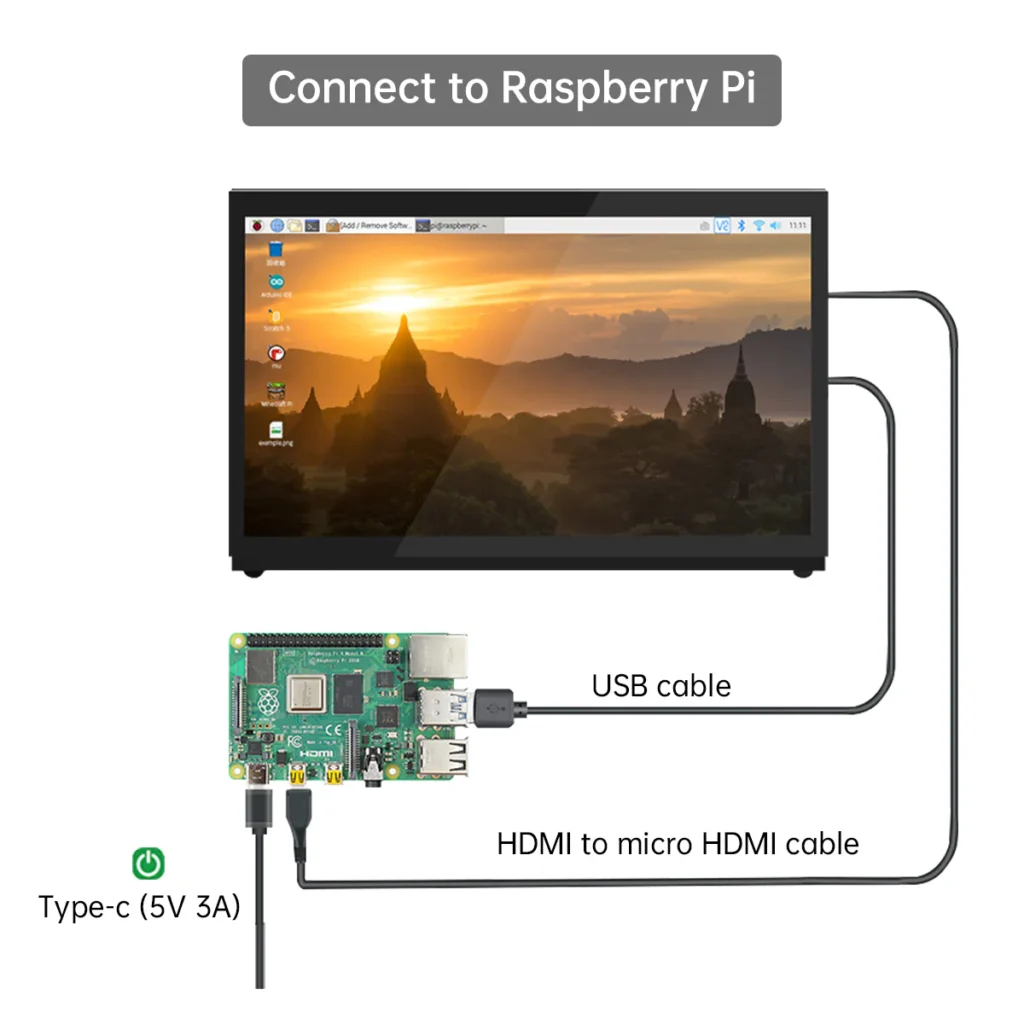
One HDMI cable carries video. One USB cable carries both the 5-point touch signal and the 5 V bus power. There is no third cable for a power adapter, no barrel jack, no wall wart. Peel the film, plug in two cables, and the desktop is live.
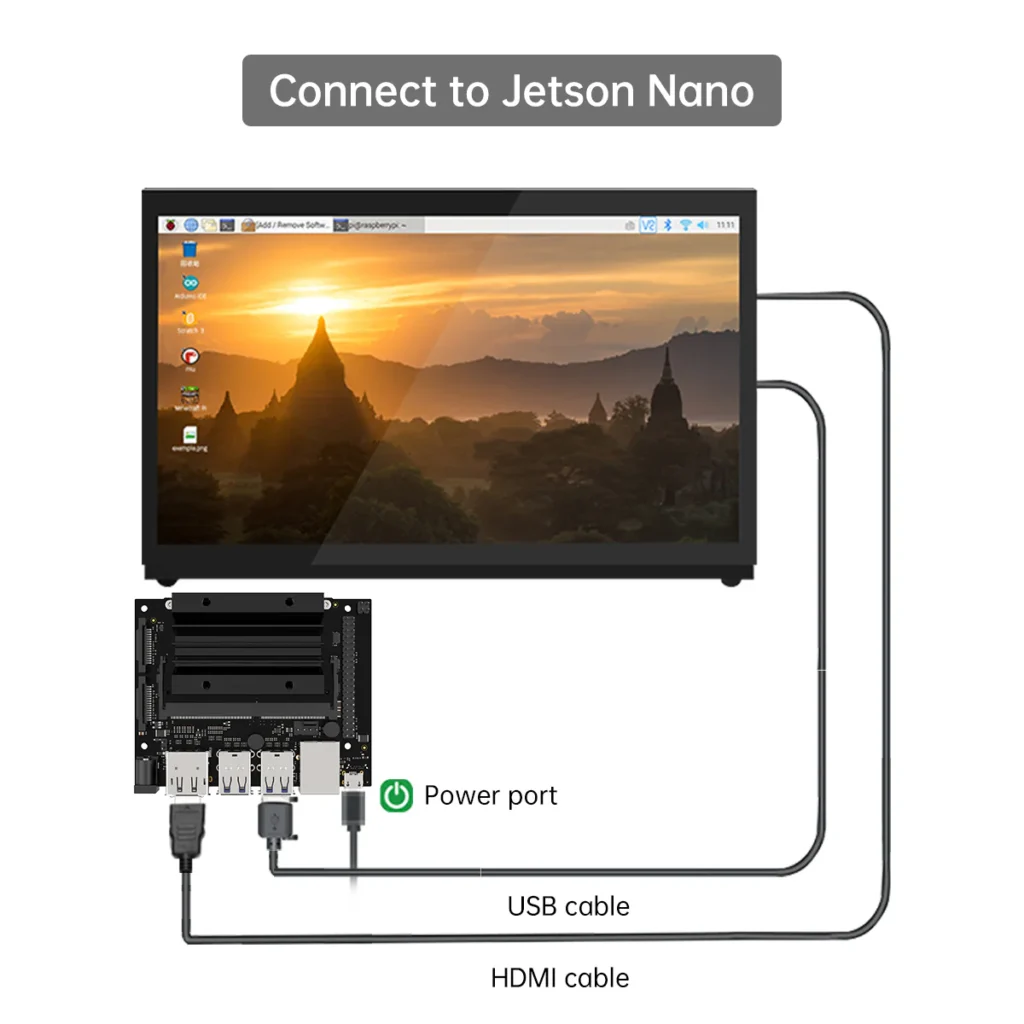
Every Raspberry Pi from the Pi 1 to the Pi 5. NVIDIA Jetson Nano. Any Windows 10, 8 or 7 PC. Ubuntu 14, 16, 18 or later. Kodi media centres. Any mini-PC with an HDMI-out. If it can push HDMI, this screen will render it — and on Raspberry Pi OS and Ubuntu, the 5-point touch is functional the instant you plug in.
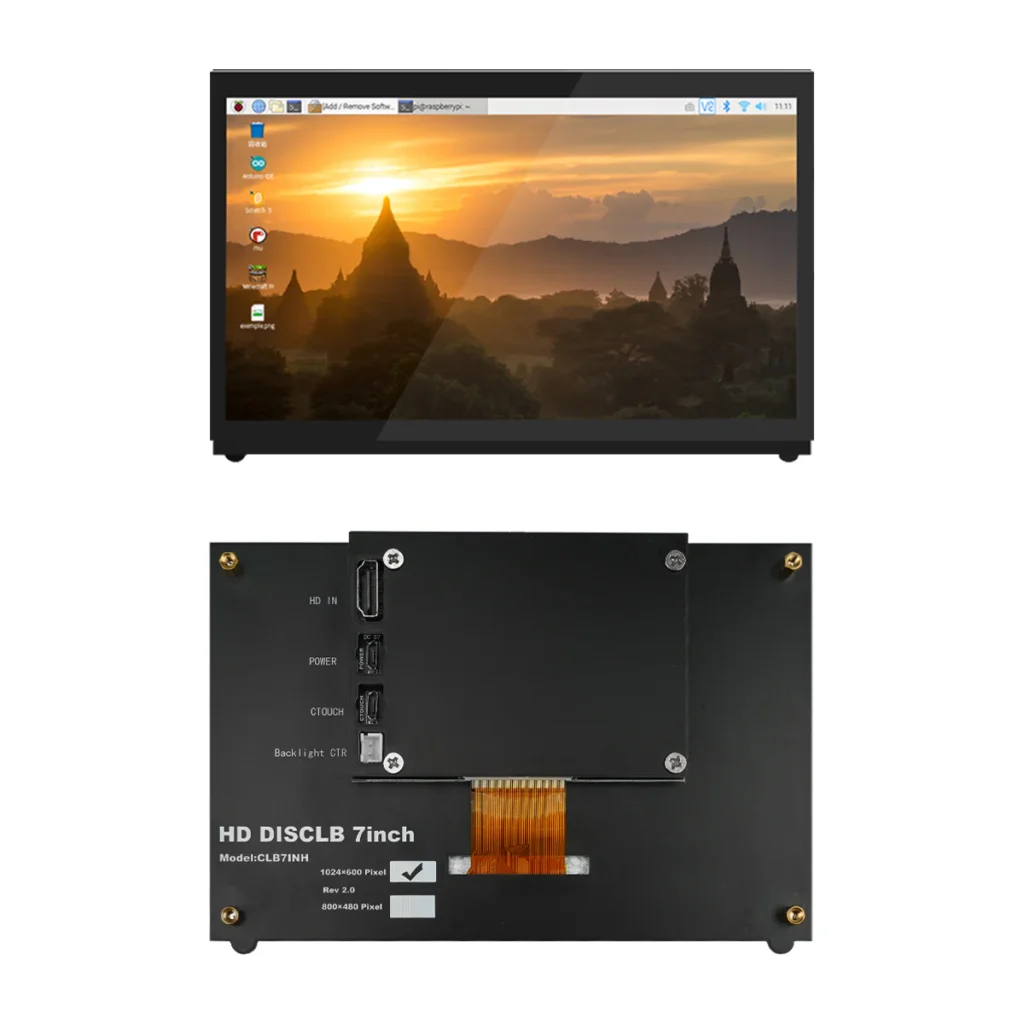
A genuine IPS panel — wide viewing angle, accurate colour reproduction, no washed-out corners when your co-worker peeks over your shoulder. Native 1024×600 is perfect for RViz, Gazebo, an FPV camera stream, or a robot HMI. Push it higher in software when you need it.
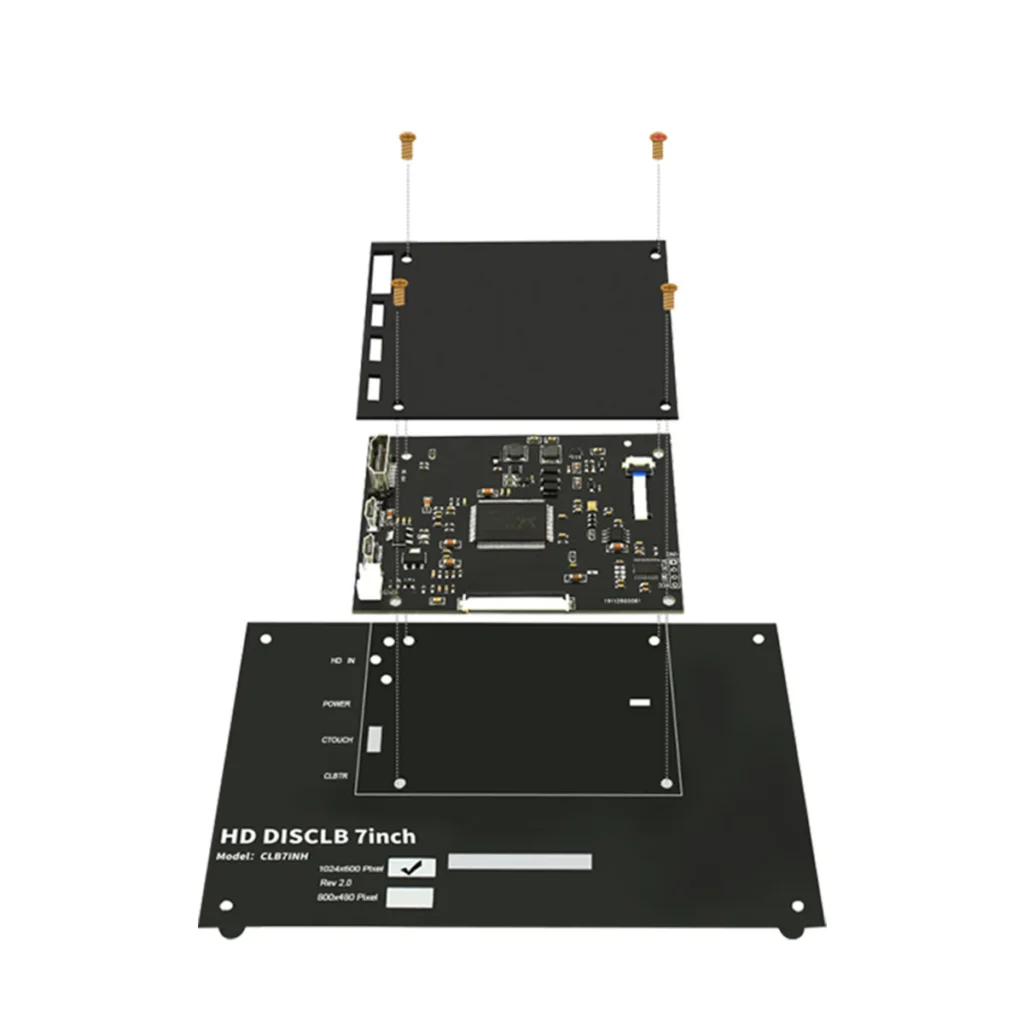
Standard VESA-compatible mounting on the back plus M4×20 column mounts on the frame — the same pattern used on JetAuto, JetHexa, JetArm and ROSPug. Bolt it to a robot deck, drop it into a stand, VESA-arm it to a workbench, or handhold it as a portable Linux console.
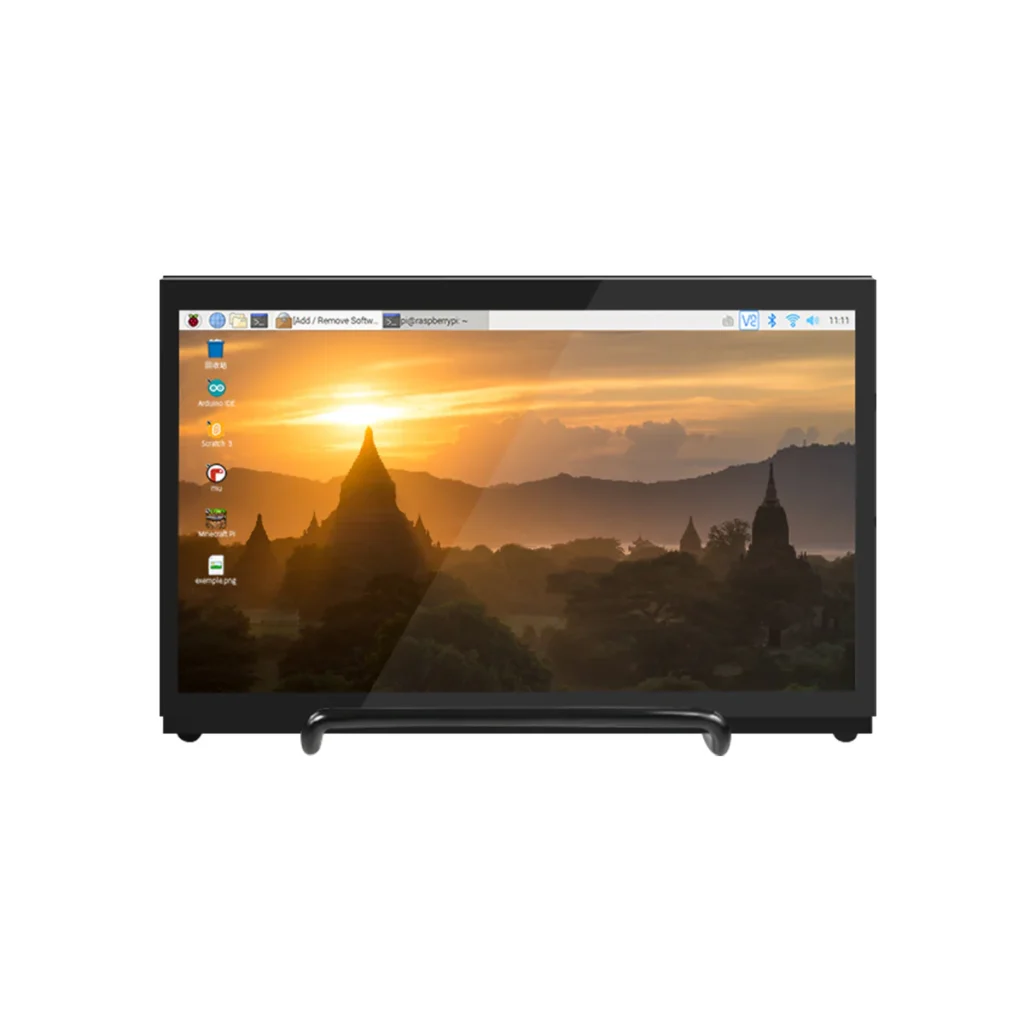
Panel, ports, mount and on-robot — five photography views.
Panel, touch, connectors, mounting, compatibility — every detail confirmed against the manufacturer datasheet.
Specs per 2026 datasheet. Institution discount, GeM listing, KYC and bulk pricing on enquiry. No-Cost EMI available via Snapmint at checkout (orders above ₹ 3,000).
You can do this in about five minutes — but here’s the ladder if you like a checklist.
Peel the protective film. Flip the panel over to expose the HDMI + USB ports.
Push one HDMI cable into the Pi / Jetson HDMI out and the screen’s HDMI in.
USB cable into a Pi / Jetson USB port and the screen’s CTOUCH port. This powers the screen and carries touch.
Power the Pi / Jetson. The desktop appears on the panel. No driver install prompt.
Touch anywhere — the cursor jumps. Five-finger gestures work on Raspberry Pi OS, Ubuntu and Windows 10.
Bolt the screen to a JetAuto / JetHexa / MasterPi deck via M4×20 columns, or VESA-arm it to a bench.
The display Indian robotics labs, dev shops and makers bolt onto a Pi or a Jetson when they need to see what the board is doing.
Deck-mounted on JetAuto, JetHexa, MasterPi or your own build — RViz maps, camera feed, ROS parameters, live status.
Portable Linux workstation for Raspberry Pi or Jetson Nano — VNC-free, HDMI-monitor-free, cable-free development.
Digital signage, retail kiosks, workshop status boards, IoT dashboards — a 5-point touch panel your uptime can rely on.
Raspberry-Pi class kits, Kodi media centres, coding-class Pi labs — a real touchscreen without the fragile ribbon-cable DSI displays.
No. On Raspberry Pi OS and Ubuntu the display is auto-detected and 5-point touch is functional from first boot. Windows 10 and 8 support 5-point touch natively. Only Windows 7 falls back to single-touch. There’s nothing to install, no config.txt edits, no xorg overrides.
Yes to both. The screen is HDMI-standard, so any Pi from the original 2012 Pi 1 through the Pi 5 works. On the Pi 4B and Pi 5 you may want an HDMI-to-micro-HDMI adapter (Pi 4 / 5 use micro-HDMI ports); the display itself uses full-size HDMI.
Yes. Plug it into any Windows 10 / 8 / 7 PC via HDMI and the touch USB cable. It behaves like any other USB touchscreen — a second monitor, a Wacom-style workspace, or a rotating primary display. On Windows 10 and 8 all five touch points work.
No adapter needed. The single USB cable that carries the touch signal also carries 5 V bus power. Plug it into a USB port on the Pi, Jetson or PC and the display lights up. If the host’s USB port is under-spec (some old laptops), use a powered USB hub.
Yes — it’s the official display for all of them. The screen has M4×20 column-mount holes matching the standard robot chassis pattern, so it drops onto a JetAuto, JetHexa, JetArm, ROSPug or MasterPi without brackets. VESA holes on the back cover generic monitor arms and stands.
Yes — bulk pricing for schools and colleges, GST invoicing at ₹ 11,240 excl. GST, No-Cost EMI from ₹ 1,249/month across 9 months (via Snapmint at checkout), GeM listing where required, and government-tender documentation. Ask for the education price sheet on enquiry.
Manufacturer warranty plus the 1-Year xBoom AMC. Every order ships pan-India with insured courier from Bengaluru. Remote setup help is included on request — we’ll walk you through the two-cable connect if you’re new to Pi / Jetson.
Tell us the host device — Raspberry Pi, Jetson Nano, or a JetAuto / JetHexa / MasterPi robot — and we’ll drop an INR proposal into your inbox with GST invoice, No-Cost EMI, and pan-India shipping options.