7-Inch HD Touch Screen

  • 1024×600 HD Resolution – Crystal-clear IPS display panel delivers vibrant colors and sharp visuals; software-configurable up to higher resolutions for flexible project needs.
  • 5-Point Capacitive Touch – Smooth and responsive multi-touch control; plug-and-play operation via HDMI + USB without requiring driver installation on Raspberry Pi or Jetson Nano.
  • Wide Compatibility – Works seamlessly with all Raspberry Pi versions, NVIDIA Jetson Nano, and mainstream mini PCs; also supports Windows 10/8/7 as a secondary monitor.
  • Supports Raspbian System – Fully supported by Raspbian OS out of the box; compatible with Ubuntu, Kodi, and Windows 10 IoT for versatile project deployments.
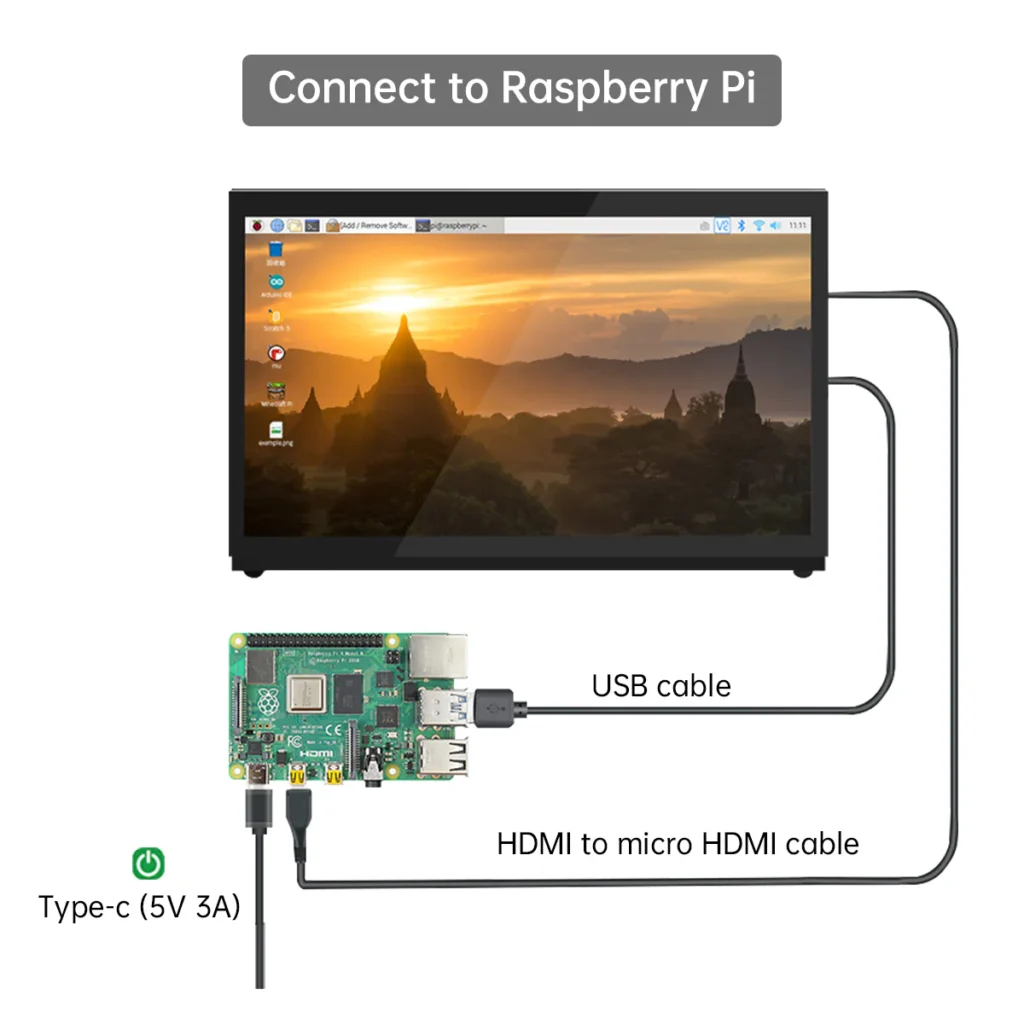
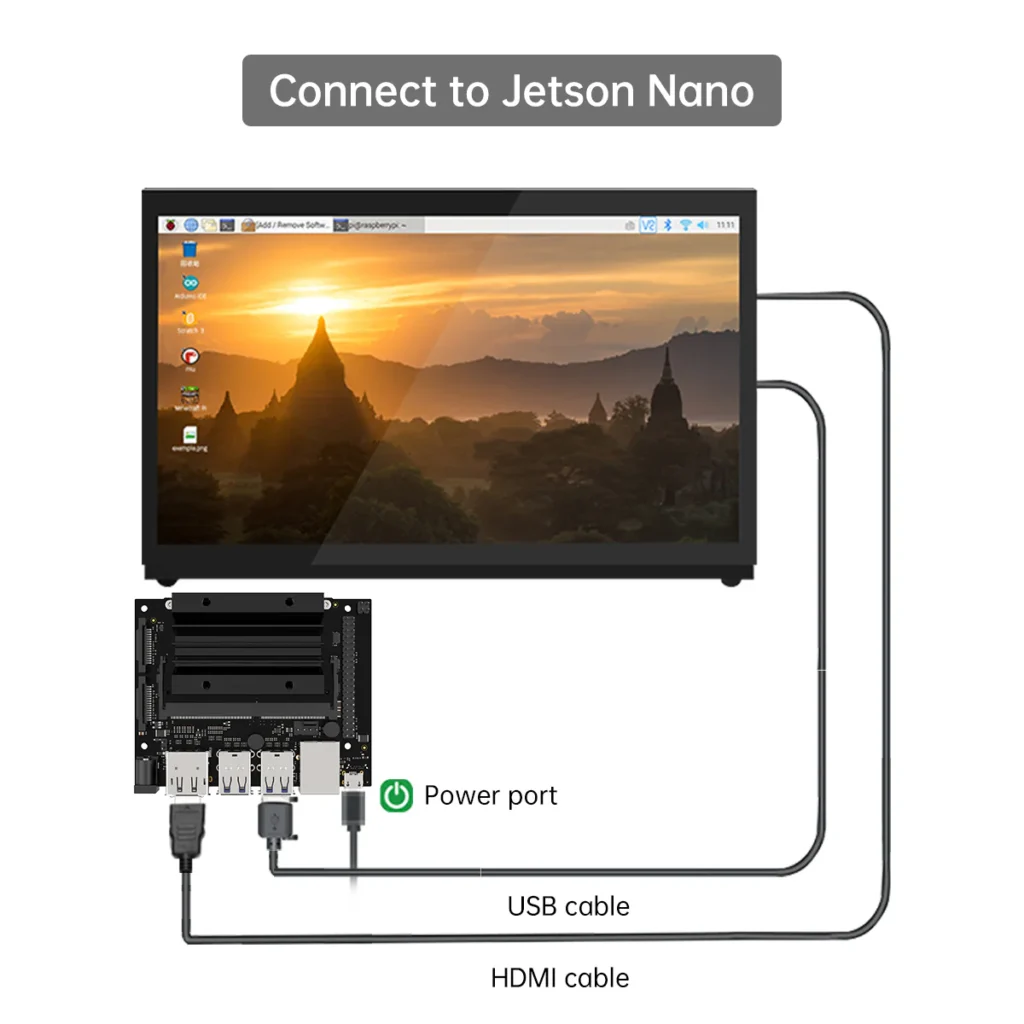
  • HDMI + USB Interface – Simple two-cable connection (HDMI for video, USB for touch and power); compact form factor ideal for robot operator panels, HMI, and embedded displays.
  • Ideal for ROS Robot Projects – Designed to pair with Hiwonder JetAuto, JetHexa, ROSPug, and other ROS robots for live parameter monitoring, debug visualization, and FPV display
  • Trusted dealerDirect manufacturer partnership
  • Pan-India deliveryInsured shipping, all states
  • Post-sale supportTraining + service included
Overview

What makes it work

Hiwonder 7-Inch HD Touch Screen (Raspberry Pi & Jetson Nano) — A+ Content | xBoom India
Display Module · Raspberry Pi · NVIDIA Jetson Nano · xBoom India

Hiwonder 7-Inch HD Touch Screen

Plug. Connect. Touch. Your Robot's Window to the World.

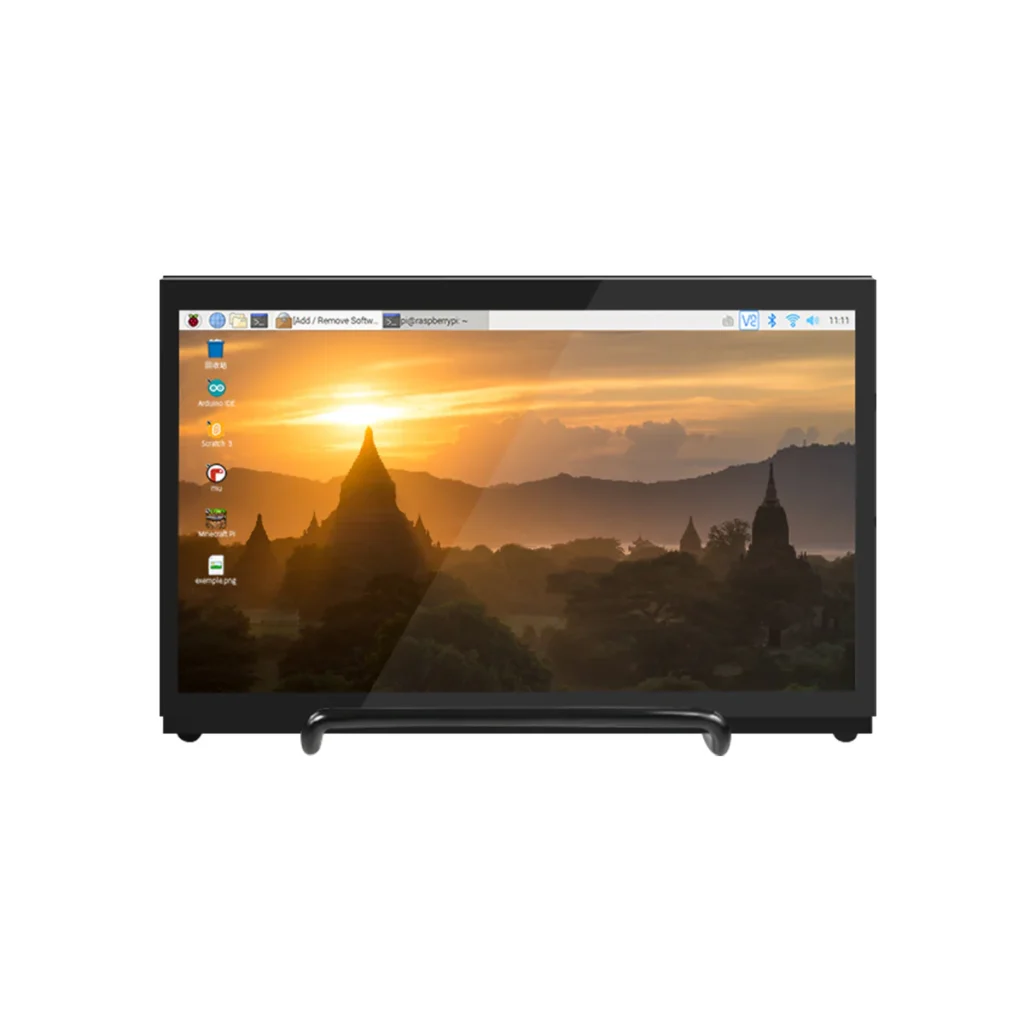
Hiwonder's 7-inch HD Touch Screen is a 1024×600 IPS capacitive touch display compatible with all Raspberry Pi versions and NVIDIA Jetson Nano. Featuring 5-point capacitive touch, standard HDMI video input, and USB touch/power interface, it is the official companion display for Hiwonder's ROS robot lineup. Supports Raspbian, Ubuntu, Windows 10/8/7, and Kodi — driver-free on Raspberry Pi OS.

1024×600 IPS Display 5-Point Capacitive Touch HDMI + USB Interface All Raspberry Pi Versions Jetson Nano Compatible No Driver Required VESA Mount Ready
Official Highlights
7-Inch HD Touch Screen — Why Choose It
  • ✅ 1024×600 IPS display — wide viewing angle, accurate color reproduction, 7-inch diagonal
  • ✅ 5-point capacitive multi-touch — driver-free on Raspberry Pi OS, Ubuntu, Windows 10/8
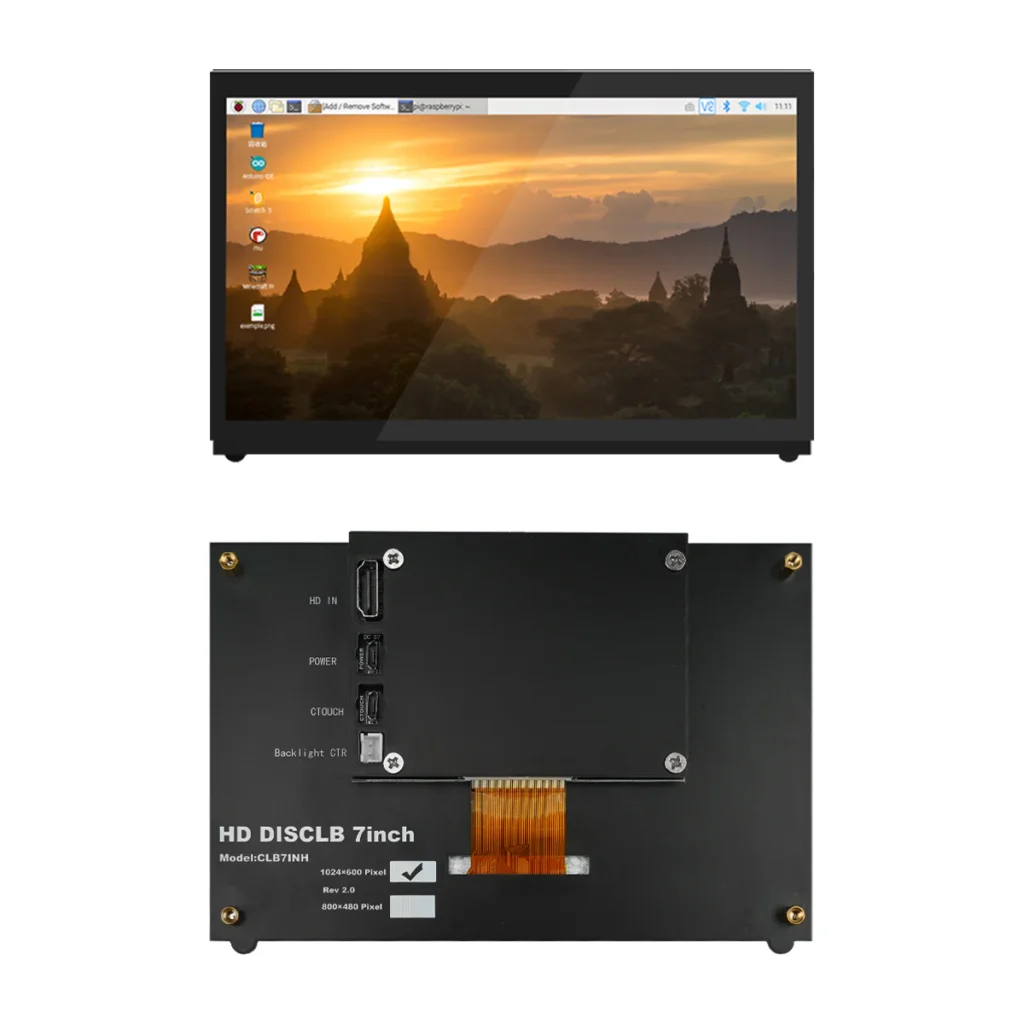
  • ✅ Standard HDMI input for video · USB CTOUCH port for touch signal and 5V power
  • ✅ Compatible: All Raspberry Pi versions (Pi 1–5), NVIDIA Jetson Nano, Windows 10/8/7, Ubuntu, Kodi
  • ✅ Official display for JetAuto, JetHexa, ROSPug, JetAcker, JetArm robot platforms
  • ✅ VESA-compatible mounting holes · M4×20 robot column bracket mounting holes
  • ✅ Software-configurable resolution beyond 1024×600 hardware native
  • ✅ Two-cable setup: HDMI + USB — clean installation, no extra power adapter
  • ✅ Applications: ROS HMI, SLAM map display, FPV monitoring, robot desktop, embedded UI, digital signage
  • ✅ Works on Windows 10 (5-point touch) · Windows 8 (5-point) · Windows 7 (single touch)
Technical Specifications
7-Inch HD Touch Screen — Full Specifications
SpecificationDetails
Screen Size7 inches diagonal
Resolution1024 × 600 pixels — hardware native; software configurable to higher
Display TypeIPS panel — wide viewing angle, accurate color reproduction
Touch5-point capacitive multi-touch
Video InterfaceStandard HDMI input
Touch InterfaceUSB (CTOUCH port — carries touch signal and powers the display)
PowerUSB-powered from host device or external USB supply
CompatibilityAll Raspberry Pi versions (1, 2, 3, 3B+, 4, 5), NVIDIA Jetson Nano, Windows 10/8/7, Ubuntu, Kodi
OS SupportRaspbian / Raspberry Pi OS; Ubuntu; Windows 10 IoT; Kodi — plug-and-play, driver-free
MountingVESA-compatible holes; M4×20 column mount holes for Hiwonder robot platforms
ApplicationROS robot HMI, SLAM map display, FPV monitoring, embedded UI, digital signage
Product Introduction
Plug-and-Play Robot Display — Zero Drivers, Full Touch
7-inch touch screen specifications IPS display
7-Inch IPS Display

1024×600 Resolution with Wide Viewing Angle

Hiwonder's 7-inch HD touch screen is a 1024×600 IPS display with 5-point capacitive multi-touch. The IPS panel technology delivers accurate colors and wide viewing angles — readable from any position when mounted on a robot, whether tilted, angled, or in direct sunlight. It is the official companion display used across Hiwonder's ROS robot lineup including JetAuto, JetHexa, ROSPug, and JetAcker.

The 7-inch standard display features 1024×600 pixel resolution, touch control, and easy two-cable wiring. It supports standard HDMI interface input and connects to Raspberry Pi and Jetson Nano via HDMI for video and USB for touch and power — making setup entirely plug-and-play on Raspberry Pi OS and Ubuntu without any driver installation.

7-inch touch screen Raspberry Pi compatibility
Universal Compatibility

Works with All Raspberry Pi Versions, Jetson Nano & Windows

The screen is fully compatible with all Raspberry Pi versions including the latest Pi 5, all earlier Pi 3/3B+/4B models, NVIDIA Jetson Nano, mini PCs, and Windows computers with HDMI output. On Raspberry Pi OS and Ubuntu, the display is recognized automatically and the 5-point touch is functional immediately — no drivers, no configuration scripts required.

On Windows 10 and 8, 5-point capacitive touch is natively supported. On Windows 7, single touch is available. This broad compatibility makes the screen a versatile choice not just for robot displays, but for any Raspberry Pi or embedded project that benefits from a 7-inch touchscreen interface — from kiosk builds to educational displays.

7-inch touch screen HDMI USB ports wiring
Simple 2-Cable Setup

HDMI + USB — Everything You Need

The screen connects via just two cables: an HDMI cable for the video signal and a USB cable (to the CTOUCH port) for the touch signal and power. The same USB connection that carries touch data also powers the display — eliminating the need for a separate power adapter in most setups. This compact two-cable design makes installation onto robot platforms clean and tidy.

On Hiwonder's JetAuto and JetAcker robot platforms, the screen mounts directly to the robot's column support brackets using M4×20 round machine screws, and connects to the Jetson Nano's HDMI and USB ports. After the robot starts up, the display shows the system desktop directly — enabling real-time SLAM map viewing, navigation control, and camera stream monitoring from the robot itself.

7-inch touch screen mounted on Hiwonder robot JetAuto ROS platform
Official Robot Platform Display

The Official Companion Display for Hiwonder ROS Robots

The 7-inch HD touch screen is the standard display used across Hiwonder's entire ROS robot lineup — including JetAuto, JetHexa, ROSPug, JetAcker, and JetArm. On these platforms, the screen mounts directly to the robot's column support brackets using M4×20 round machine screws and connects to the Jetson Nano's HDMI and USB ports. After the robot starts up, the display shows the system desktop directly — enabling real-time SLAM map viewing in RViz, navigation control, and live camera stream monitoring from the robot itself.

The screen is used for displaying ROS map interfaces during SLAM navigation, monitoring robot status parameters, viewing FPV camera feeds, and running robot control software directly on the robot. The 7-inch size is ideal for robot-mounted displays: large enough to see SLAM map detail and parameter values clearly, compact enough to not significantly increase the robot's footprint or weight.

  • Official display for JetAuto, JetHexa, ROSPug, JetAcker, JetArm platforms
  • Displays ROS desktop, SLAM maps in RViz, navigation interfaces, camera feeds
  • M4×20 column bracket mounting — direct integration onto Hiwonder robot platforms
  • VESA mount holes — compatible with standard monitor mounting solutions
  • 7-inch IPS — ideal size for robot-mounted use: clear but compact
  • Plug in HDMI + USB, robot starts — display shows system desktop automatically
7-inch touch screen back ports HDMI USB CTOUCH mounting
Simple Installation & Wide OS Support

Zero Configuration on Linux · Touch on Windows 10/8 · Works Everywhere

The 7-inch HD Touch Screen supports Raspbian, Ubuntu 14/16/18, Windows 10/8/7, and Kodi with full driver-free plug-and-play operation on Raspberry Pi OS. On Windows 10, 5-point capacitive touch is natively supported without any driver installation. On Windows 8, 5-point touch also works natively. On Windows 7, single touch is available. This makes the screen versatile across any OS environment.

The screen resolution can be software-configured beyond the 1024×600 hardware native resolution using OS display settings — useful for applications that need more workspace. The screen is powered entirely via the USB CTOUCH port (5V), with no separate power supply required in most setups. This two-cable design (HDMI + USB) results in clean, tidy installations on any robot platform or embedded project.

  • Raspbian / Raspberry Pi OS — driver-free, auto-detected, 5-point touch works immediately
  • Ubuntu 14/16/18 — driver-free, automatic configuration
  • Windows 10 — 5-point capacitive touch natively supported
  • Windows 8 — 5-point touch natively supported
  • Windows 7 — single touch supported
  • Kodi — plug-and-play compatible
  • Resolution adjustable beyond 1024×600 via OS display settings
  • 5V USB powered — no separate power supply needed
Image Gallery
7-Inch HD Touch Screen — All Product Images
Spec Infographic
7-Inch HD Touch Screen — Key Specifications at a Glance

7-Inch HD Touch Screen — IPS · 1024×600 · 5-Point Touch

HDMI + USB · Raspberry Pi All Versions · Jetson Nano · Windows · Plug & Play
7"
IPS Screen
Wide Viewing
1024
×600 px
Resolution
5PT
Touch
Capacitive
HDMI
Video In
Standard
USB
Touch+Power
Plug & Play
All Pi
Versions
Pi 3/4/5
Jetson
Nano OK
ROS Ready
0
Drivers
Zero Install
Frequently Asked Questions
7-Inch HD Touch Screen FAQ
Does this screen require any driver installation?
No driver installation is required when using Raspbian / Raspberry Pi OS or Ubuntu. Simply connect the HDMI cable for video and the USB cable to the CTOUCH port for touch and power — the system recognizes both the display and touch automatically. On Windows 10 and 8, 5-point capacitive touch is also supported natively.
Is it compatible with Raspberry Pi 5?
Yes. The screen is compatible with all Raspberry Pi versions including the latest Pi 5. Both HDMI and USB are available on the Pi 5, and no configuration changes are needed. It also works with all older Pi 3/3B+/4B models, NVIDIA Jetson Nano, and any Windows or Ubuntu computer with HDMI output.
How is the screen powered?
The screen is powered entirely via the USB connection to the CTOUCH port. The same cable that carries the touch data also provides 5V power to the display — so you only need two cables total (HDMI + USB). In most cases, the screen can be powered directly from the Raspberry Pi or Jetson Nano's USB port, though a separate USB power adapter can also be used if the host device's USB power is limited.
Can I use this as the main robot display for ROS navigation?
Absolutely — this is its primary application across Hiwonder's robot lineup. On JetAuto, JetHexa, and JetAcker, the screen is mounted directly on the robot's column bracket and shows the ROS desktop, SLAM maps in RViz, live camera streams, and navigation control interfaces during active robot operation.
Can the resolution be changed from 1024×600?
Yes. The hardware-native resolution is 1024×600 pixels, but it can be software-configured to display higher resolutions by adjusting display settings in Raspberry Pi OS or Ubuntu. This provides a larger virtual workspace for applications requiring more screen real estate — though UI elements will appear smaller at higher virtual resolutions on the physical 7-inch panel.
Specifications

The full sheet

Reviews

What buyers say

There are no reviews yet.

Be the first to review “7-Inch HD Touch Screen”

Your email address will not be published. Required fields are marked *

WhatsApp Chat
Hit enter to search or ESC to close