UHand UNO Starter Kit – Left Hand

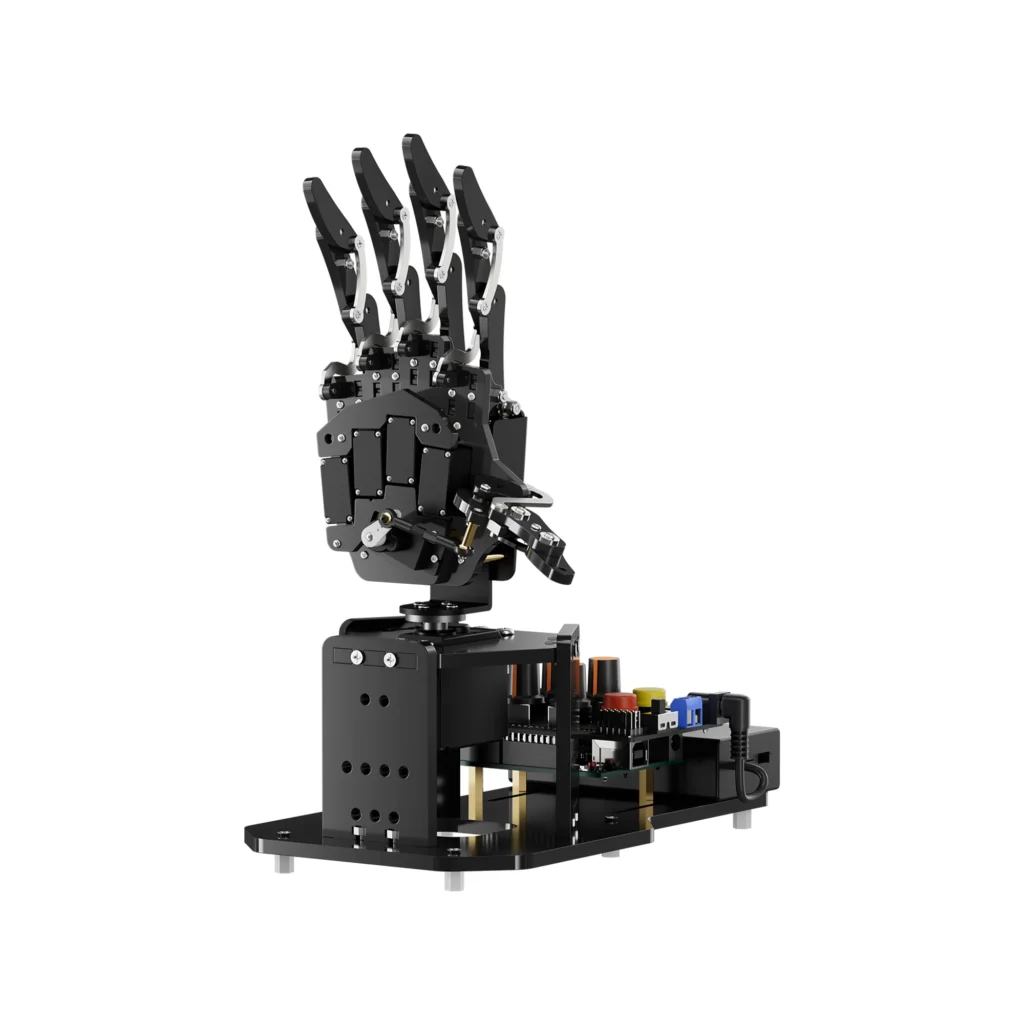
  • Left-Hand Variant – Anatomically accurate left-hand bionic design with 5 independently driven fingers and a pan-tilt wrist; mirrors real human hand proportions and finger movement.
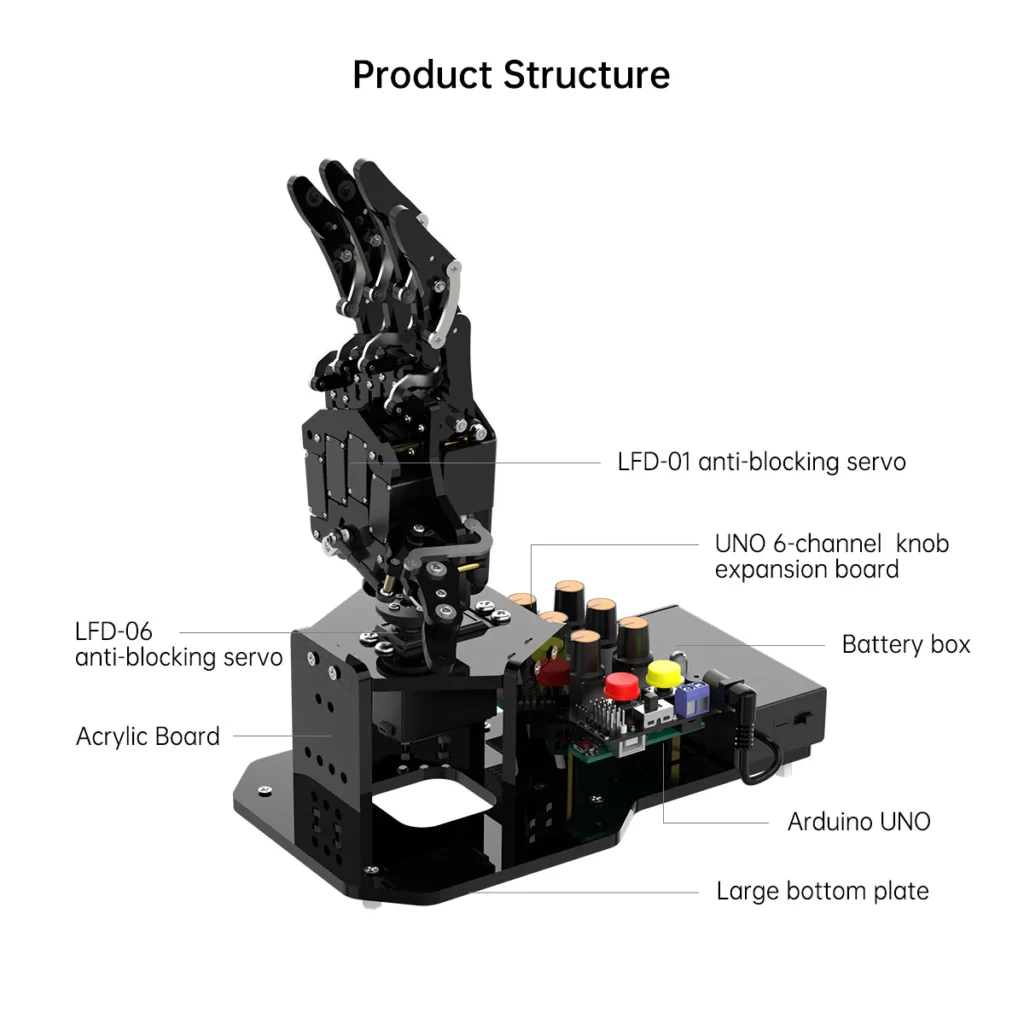
  • 6 Anti-Blocking Servos – Six anti-stall servos (LFD-06 + LFD-01) protect against burn-out from blockage or collision, significantly extending servo lifespan for long-term classroom use.
  • 6-Channel Knob Controller – UNO 6-channel knob expansion board enables real-time palm joint control via potentiometers without writing code; offline motion editing and playback built in.
  • Bluetooth App Control – Built-in Bluetooth module supports iOS/Android app control (button tap or slider); wireless somatosensory glove control maps hand posture directly to robot fingers.
  • Sensor Expansion Ready – Multiple expansion ports support ESP32-CAM (color recognition, face recognition, visual tracking), ultrasonic ranging, touch sensor, and accelerometer modules
  • Trusted dealerDirect manufacturer partnership
  • Pan-India deliveryInsured shipping, all states
  • Post-sale supportTraining + service included
Overview

What makes it work

Hiwonder uHand UNO Left Hand Starter Kit — A+ Content | xBoom India
Open-Source Bionic Robotic Hand · Arduino · AI Vision · xBoom India

Hiwonder uHand UNO — Left Hand Starter Kit

The Human Hand, Re-engineered. Programmable from Day One.

uHand UNO is an open-source bionic mechanical hand launched by Hiwonder for entry-level developers. It is developed based on Atmega328 and is fully compatible with the Arduino platform. Featuring a 6-channel knob controller, Bluetooth module, 6 anti-blocking servos, and expansion ports for secondary development — uHand UNO makes robotic hand programming accessible and creative for beginners and advanced makers alike.

Left Hand Variant Arduino / Atmega328 6 Anti-Blocking Servos Bluetooth App Control 6-Channel Knob Board Somatosensory Glove Ready ESP32-S3 AI Vision Expansion
Official Highlights
uHand UNO Left Hand Starter Kit — Why Choose It
  • ✅ Open-source bionic mechanical left hand based on Atmega328 — fully Arduino IDE compatible
  • ✅ 6 anti-blocking servos: LFD-06 (wrist, 180°) + LFD-01 × 5 (fingers) — auto torque cut when blocked
  • ✅ 6-channel knob expansion board — real-time individual finger control, no code required
  • ✅ Bluetooth module — Wonderbot app (iOS/Android) for wireless control and slider adjustments
  • ✅ Somatosensory wireless glove: flex your fingers → uHand UNO mirrors movements in real time
  • ✅ ESP32-S3 vision module (expansion): color recognition, face recognition (CNN), ball grasping, WiFi HD stream
  • ✅ IO + I2C expansion ports: touch sensor, RGB ultrasonic, accelerometer, dot matrix, MP3 module
  • ✅ 7.4V LiPo 2×1200mAh battery with charger · 207 × 120 × 257 mm · Aluminum alloy + acrylic body
  • ✅ Full open-source Arduino C/C++ code · PC software for action group editing · Tutorial at wiki.hiwonder.com
  • ✅ Starter Kit | Advanced Kit (+ wireless glove) | Ultimate Kit (+ all sensors + ESP32-S3 vision)
Technical Specifications
uHand UNO (Left Hand) — Full Specifications
SpecificationDetails
VariantLeft Hand — Starter Kit
ControllerArduino UNO (Atmega328) — fully compatible with Arduino IDE and hardware interfaces
Expansion BoardUNO 6-channel knob expansion board with Bluetooth module slot
Finger ServosLFD-01 × 5 (finger servos) — anti-blocking with stall protection
Wrist ServoLFD-06 (pan-tilt wrist) — 180° range, anti-blocking
WirelessBluetooth module (Wonderbot app — iOS/Android)
Control Methods6-channel knob potentiometer (direct finger control), Wonderbot app (Bluetooth), somatosensory wireless glove
AI Vision ExpansionESP32-S3 camera module — color recognition, face detection, ball tracking (I2C connection)
Battery7.4V LiPo — 2 × 1200mAh (2400mAh total); charger included
Body MaterialAluminum alloy + acrylic components
Dimensions207 × 120 × 257 mm (assembled)
ProgrammingArduino IDE (C/C++); open-source annotated code included
Expansion PortsIO & I2C interfaces — supports ESP32-S3, accelerometer, touch sensor, RGB ultrasonic
IncludesuHand (Left), Arduino UNO, knob expansion board, Bluetooth module, battery, charger, 6 servos, USB cable, tools, accessories
Product Introduction
Open-Source Arduino Robotic Hand — Control Any Way You Like
uHand UNO knob control 6-channel board
Arduino Programming, Open Source

Atmega328 Platform with Full Arduino Compatibility

uHand UNO is built on the Atmega328 platform and compatible with Arduino programming. The uHand UNO programs are open-source. With detailed tutorials and example projects for secondary development, users can easily customize and expand their robotic hand with entirely new behaviors and interaction scenarios.

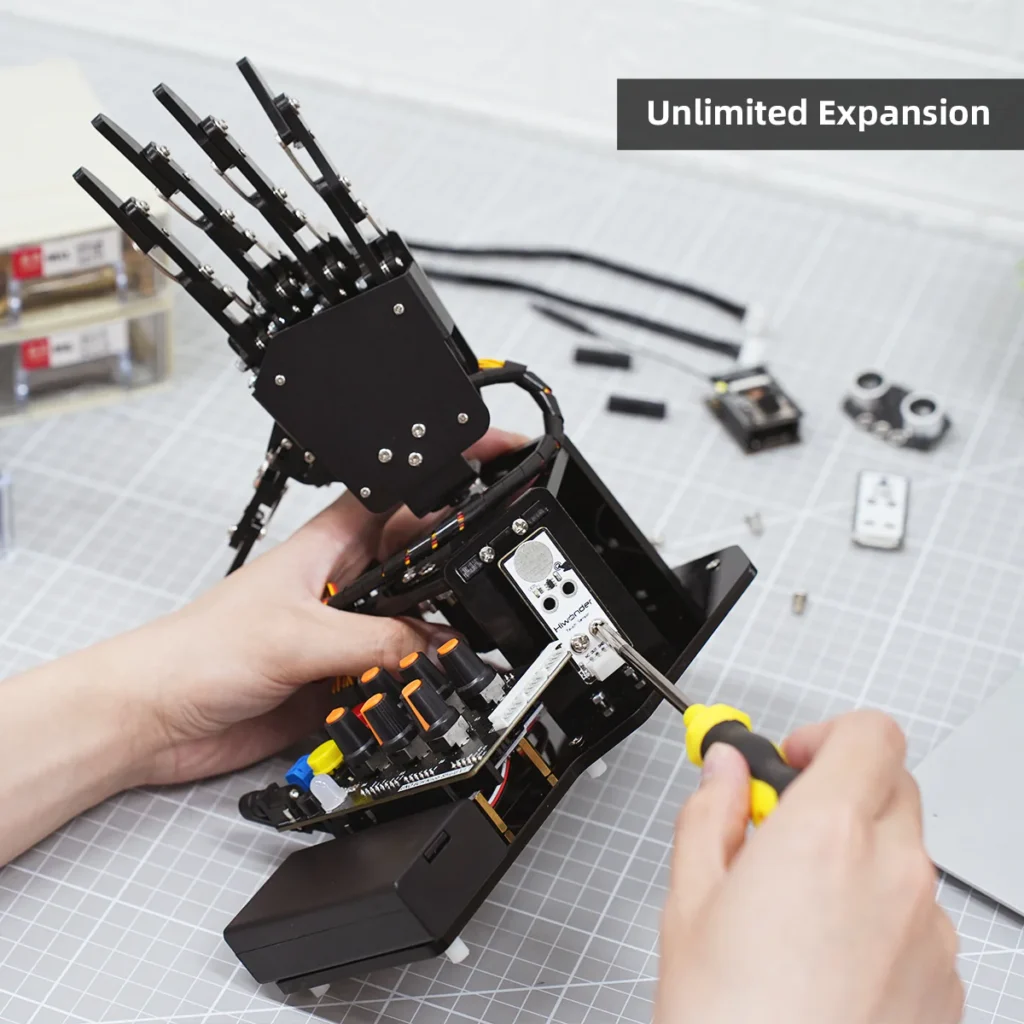
uHand UNO features a 6-channel knob controller, Bluetooth module, six anti-blocking servos, and other high-performance hardware. With multiple expansion ports supporting sensors like ESP32 Cam, accelerometer, touch sensor, and RGB ultrasonic sensor, users can easily perform secondary development to enable sonic ranging, Bluetooth communication, and pose control.

Control the palm joint movements quickly through the knob potentiometer, immersing yourself in the seamless operation of the robotic hand without writing a single line of code. Take command of uHand UNO effortlessly through the Wonderbot app, allowing you to execute desired actions with a tap of a button or a swipe of the slider on your iOS or Android device.

uHand UNO anti-blocking servo design
High Performance — Anti-Blocking Servos

6 Anti-Blocking Servos with Stall Protection

uHand UNO's six servos — LFD-06 for the pan-tilt wrist and LFD-01 for each of the five fingers — feature an anti-blocking design that automatically detects when a finger is physically blocked and cuts torque to prevent overload and burn-out. This dramatically extends servo life compared to standard designs, allowing the hand to safely interact with real objects without risking damage.

The servos provide exceptional accuracy, data feedback, and easy wiring. The 180° wrist rotation range enables a wide variety of grasping and presentation postures. The overall hand structure closely mimics the anatomical structure of a real left hand, making uHand UNO both a functional robotic tool and a compelling bionic engineering demonstration platform.

uHand UNO somatosensory glove wireless control
Versatile Control Options

Wireless Glove, App & Knob — Three Ways to Control

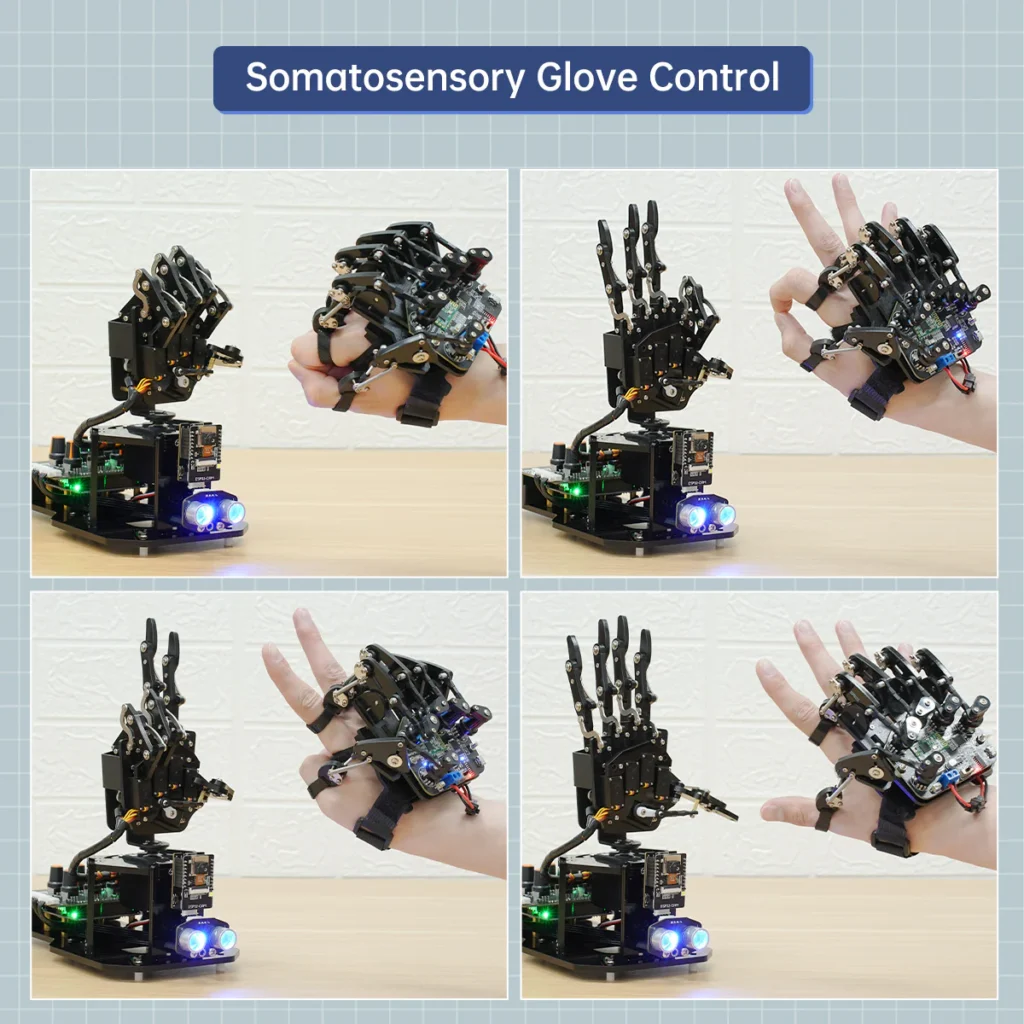
uHand UNO supports both app control via Bluetooth and wireless glove control (somatosensory control). Users can utilize the knob potentiometers for real-time knob control and offline action group editing. When you wear the somatosensory wireless glove and flex your fingers, the glove's potentiometers and accelerometer transmit the hand posture data wirelessly — and uHand UNO mirrors each finger movement in real time.

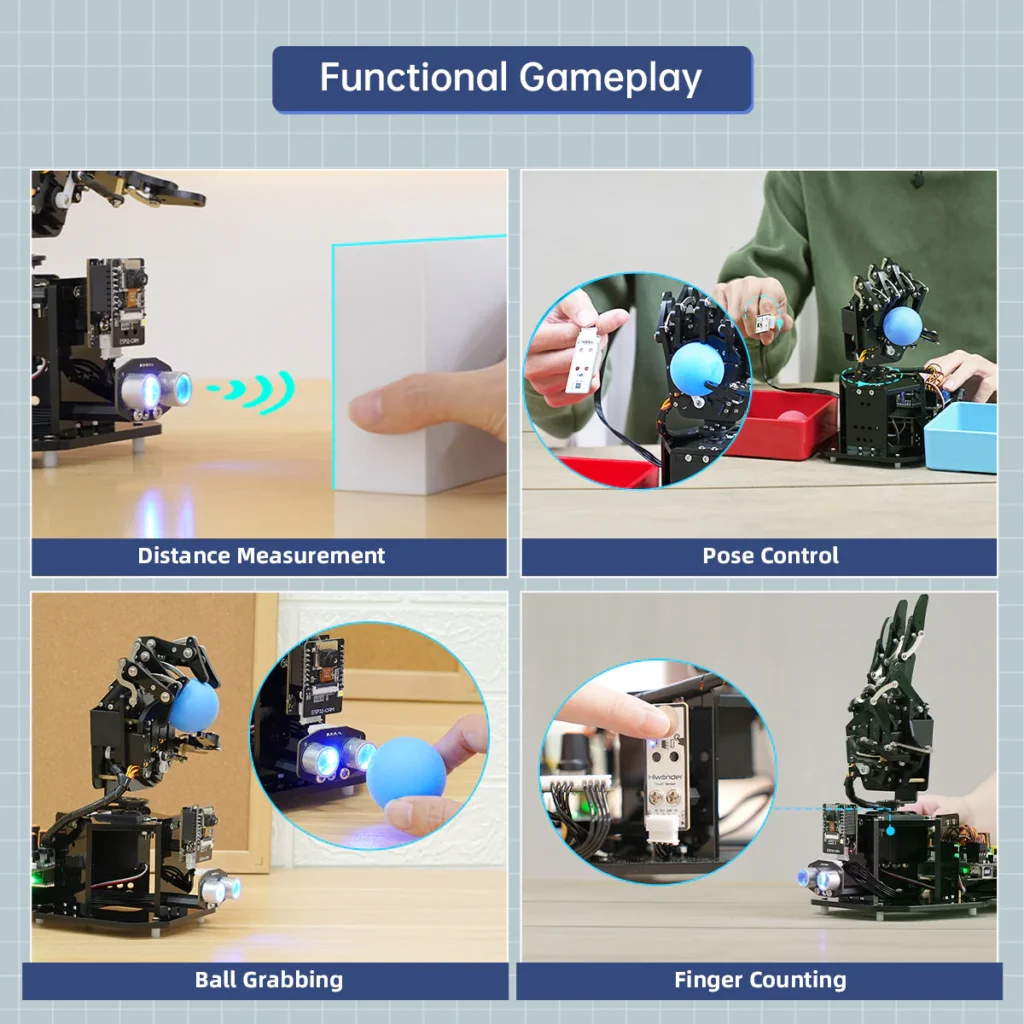
Users can activate uHand UNO to open its hand and begin counting by touching the metal plate of the touch sensor. When the glowing ultrasonic module detects an object, the buzzer emits a sound and the RGB light turns green — at which point the user can place a ball in the center of the palm, and the robot grasps it and rotates to release it. These interactive AI games make uHand UNO engaging for all ages.

uHand UNO ESP32-S3 AI vision module color recognition
AI Vision Expansion

ESP32-S3 Camera for Color Recognition & Face Detection

uHand UNO supports a wide range of sensor expansions through its IO and I2C interfaces. The ESP32-S3 camera module connects to the expansion board's I2C interface and adds AI vision capabilities: color recognition and tracking, face recognition using CNN algorithms, and ball grasping based on visual detection — all without replacing the main Arduino controller.

Additional supported expansion modules include: the glowing ultrasonic sensor (distance measurement with RGB light feedback), touch sensor (capacitive counting interaction), and accelerometer (orientation-based control). All expansion programs are provided open-source with detailed code annotations, enabling progressive secondary development projects from simple to advanced.

uHand UNO wireless glove somatosensory control real-time mirroring
Somatosensory Wireless Glove Control

Wear the Glove — uHand UNO Mirrors Your Every Movement

When you wear the somatosensory wireless glove and flex your fingers, the glove's potentiometers and accelerometer transmit your hand posture data wirelessly in real time — and uHand UNO mirrors each finger movement precisely and immediately. This enables intuitive human-robot hand interaction for demonstrations, educational showcases, and creative applications. The wireless glove is compatible with both the left-hand and right-hand variants.

uHand UNO supports multiple interactive AI scenarios that go beyond just controlling finger positions: when you activate the touch sensor, uHand UNO opens its hand and begins counting. When the glowing ultrasonic module detects an object within range, the buzzer sounds and the RGB light turns green — at which point uHand UNO grasps the ball and rotates to release it. These programmable interaction sequences make uHand UNO engaging as both a learning tool and a demonstration device.

  • Somatosensory wireless glove: flex fingers → uHand UNO mirrors in real time
  • Touch sensor activation: uHand opens and counts
  • Ultrasonic detection + RGB light feedback: auto grasp and release ball
  • Programmable interaction sequences in Arduino C/C++ or Python
  • Wireless transmission — no physical tether between glove and hand
  • Compatible with left-hand and right-hand variants equally
uHand UNO PC software action group editing Arduino IDE programming
PC Software & Arduino Programming

Open-Source Arduino Code · Action Group Editor · Secondary Development

uHand UNO programs are fully open-source and compatible with the Arduino IDE. All source code includes detailed annotations for easy self-study and secondary development. Users can customize uHand UNO's behavior by editing the provided example programs or writing entirely new programs from scratch. The Atmega328 platform's broad compatibility ensures access to the full Arduino library ecosystem.

The PC control software provides a graphical interface for offline action group editing — recording, saving, and playing back complex hand gestures without any coding required. Users can create sequences of finger positions, timing, and grip patterns and save them as action groups for later playback. Tutorial resources include schematics, source codes, videos, and experimental projects available at wiki.hiwonder.com. These cover Atmega328/Arduino programming, servo control, Bluetooth communication, sensor integration, and ESP32-S3 AI vision expansion.

  • Arduino IDE compatible — standard C/C++ with Atmega328 board settings
  • Full open-source code with detailed annotations for secondary development
  • PC software — offline action group editing, recording, saving, playback
  • Tutorials: Arduino programming, servo control, Bluetooth, sensors, ESP32-S3 AI vision
  • Schematics and source codes at wiki.hiwonder.com
  • Compatible with the entire Arduino library ecosystem
Image Gallery
uHand UNO (Left Hand) — All Product Images
Spec Infographic
uHand UNO (Left Hand) — Key Specifications at a Glance

uHand UNO — Open-Source Bionic Robotic Left Hand

Arduino · 6 Anti-Blocking Servos · Bluetooth · Somatosensory Glove · AI Vision
6
Servos
Anti-Blocking
ATmega
328 Core
Arduino
BT
Bluetooth
App Control
7.4V
LiPo
2×1200mAh
6CH
Knob Board
Live Control
I2C
+ IO Ports
Expandable
Left
Hand Type
Starter Kit
Open
Source
Full Code
Product Videos
uHand UNO — Demo & Tutorial Videos
Frequently Asked Questions
uHand UNO (Left Hand) FAQ
What is the difference between the Left Hand and Right Hand versions?
The left-hand and right-hand variants are mirror-image builds. All electronics, servos, software, expansion ports, and tutorials are identical — only the physical hand orientation differs. Both versions are fully compatible with the same expansion accessories including the somatosensory wireless glove, ESP32-S3 AI vision module, and sensor expansion kit.
Does uHand UNO work with the Arduino IDE out of the box?
Yes. uHand UNO is fully compatible with the Arduino IDE and Atmega328 board settings. Open-source code with detailed comments is provided in the tutorial package. You can download, edit, and upload custom programs directly via a Type-B USB cable without any special library installation beyond the standard Arduino board library.
What is the anti-blocking servo and why does it matter?
Anti-blocking servos (LFD-06 and LFD-01) automatically detect when a finger encounters physical resistance and cut torque to prevent burn-out. Standard servos continue attempting to rotate against an obstacle, generating heat and eventually failing. The anti-blocking design means uHand UNO can safely grasp, hold, and release real objects repeatedly without risking servo damage — significantly extending operational life.
Can I add the AI vision module separately to the Starter Kit?
Yes. The ESP32-S3 camera module can be purchased separately and connected to the I2C interface on the expansion board. Once installed, uHand UNO gains color recognition and tracking, face recognition via lightweight CNN, and visual ball grasping capabilities. Full tutorials for AI vision expansion are available at wiki.hiwonder.com.
What's included in the Starter Kit versus Advanced or Ultimate kits?
The Starter Kit includes the assembled left-hand frame, 6 anti-blocking servos, Arduino UNO board, 6-channel knob expansion board, Bluetooth module, 7.4V battery with charger, Type-B USB cable, screwdriver, 2 balls, and full tutorial access. The Advanced Kit adds the somatosensory wireless glove; the Ultimate Kit further adds the full sensor expansion pack including ESP32-S3 vision module, glowing ultrasonic sensor, touch sensor, and accelerometer.
Packing List
uHand UNO Left Hand Starter Kit — What's in the Box
uHand UNO Left Hand Packing List
Specifications

The full sheet

Reviews

What buyers say

There are no reviews yet.

Be the first to review “UHand UNO Starter Kit – Left Hand”

Your email address will not be published. Required fields are marked *

WhatsApp Chat
Hit enter to search or ESC to close